Showing posts with label ftm. Show all posts

Tuesday, February 19, 2013

Genealogy Apps in the Mac App Store (Update)

Over two years ago I wrote about the launch of the Mac App Store, Apple's resident app store available on all modern Macs, and the three genealogy-related applications that launched with it. At the time the three applications available were MacFamilyTree, Family Tree Maker, and Date Calculator.

Two years later, what is the state of Mac genealogy in the App Store? There are now six applications that show up if you search 'genealogy':

Six Genealogy Apps in the Mac App Store
MacFamilyTree and Date Calculator are still there, while Family Tree Maker has been dropped from App Store. Newly added applications include Heredis, My Family Tree, GedScape Gold, and MemoryMiner.

Why did Ancestry.com drop Family Tree Maker from the App Store? I have no idea, but there are a few possibilities. The coding standards for applications in the Mac App Store are very strict, and they've gotten stricter over time. It's possible one of the those restrictions made it difficult for Ancestry.com to comply with the rules of the store. It's also possible that the lack of a clear upgrade path in the App Store was a bigger issue. Ancestry.com sells annual upgrades to their genealogy applications, and the App Store doesn't make this very easy. If anyone purchased Family Tree Maker on the App Store, I'm curious if you received any notification that the app was pulled, and for what reason.

Heredis had a major update recently, and that included launching it into the Mac App Store, as well as a free version for iPhone and iPad. Heredis calls this version the 'Blue Suite' and includes interperable version on PC, Mac, and iOS. I haven't used this new version of Heredis, but it looks quite impressive. There's actually a 20% off sale going on now for Heredis, through February 24, through the app store or through their web site. They have a free trial version also, so it's worth checking out first. Two of the more interesting features to me include the ability to create illustrated charts (i.e. a tree superimposed on an actual tree graphic) and the ability to generate a book. I've published a genealogy book before, but it required a lot of work in Adobe InDesign, and took months to finish. Imagine being able to generate a book with a single click? I haven't used this feature, but it's something I think all genealogy application should offer in some form.

My Family Tree and GedScape Gold are two apps I've never heard of before. My Family Tree seems to be a chart-based genealogy app that keeps an updated chart that you can add people to, but they show no other features in their description, and no trial version on their web site. According to reviews in the App Store, there are some bugs and support is not easy to get. It looks like an early version of an app that could offer a simple genealogy option to some, but it isn't quite ready yet (or supported well enough). GedScape Gold is a program to browse GEDCOM file and output a web version of your family tree. The application seems to have mixed reviews, although unlike My Family Tree, there is a support site and a free trial version available to test before buying. I suppose there is a purpose for GEDCOM viewers, but I certainly lean towards more full-featured applications.

MemoryMiner is an application I really like, and am happy to see it's in the App Store. This application fits in my visual sensibilities, where you can take a large number of photographs and link each person in the photo and can switch between looking at photos fro ma specific place, or of a specific person, etc. It's very powerful, and also includes the ability to import a GEDCOM file to populate the person database. My only big problem with the app is that while you can import a GEDCOM, it's very difficult to subsequently update information on the people you import. If you're working on a project over a long period of time, chances are your family database will be updated, and it would be great if you could import those changes easily. Another problem is the web site of the company hasn't been updated since 2011. Hopefully this is still an actively developed application, as it is unique in the way it allows you to tell a visual story of your family.

One last note. In my post last year, I mentioned that Date Calculator was created by the same company that puts out GEDitCOM II, a very interesting genealogy program for the Mac. GEDitCOM II has some very advanced features I've never seen in any genealogy program on any platform, including scripting using Applescript, Python and Ruby (including an online library of downloadable scripts), allows you to completely customize the user interface (including downloadable UIs), outputting a book using LaTeX (see this PDF of a book output of the Windsor family), etc. It's really quite an impressive program, but even though its been updated to work with application signing for OS X (a feature needed to show that a program is from a reliable source), it is not yet available through the App Store. I'm sure there are some good technical reasons for it not being available through the App Store, but it's really a shame as I think GEDitCOM II is underrated and could use the extra publicity of being available through the App Store to gain marketshare.

Tuesday, February 1, 2011

New iPhone and iPad App from Ancestry.com

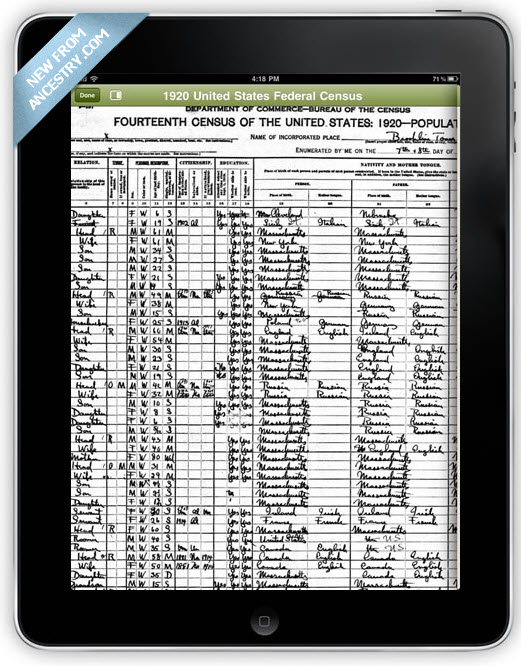
If you use Ancestry.com and you have an iPhone or iPod Touch, you might know about their Tree-to-Go app that came out awhile back. It was a very basic application for viewing the family trees that you had on Ancestry.com. Frankly, it wasn't particularly useful, as it only let you view the trees you had uploaded to Ancestry.com and wasn't very interactive. In addition, if you had an iPad with its larger screen, it was not optimized for that, and could not show anything more on the iPad than on the iPhone.
Ancestry on iPhone
That all changed yesterday with the introduction of a new app, now called simply Ancestry.

This new version seems much more polished, and adds some major features.

First off, it fully supports the iPad, and can take advantage of the larger screen. You can now see not only the trees you have on Ancestry.com, but those that are shared with you from other users.

Also, if you've attached records to people in your tree, such as a census record, you can now view those records on your device (see the picture on the right).

For those who use both Ancestry.com and an iOS device (iPhone, iPod Touch or iPad) this seems like a very useful application, especially if you share trees with other Ancestry.com users. They also announced that they are 'carefully considering' the creation of an Android version as well, although I wouldn't hold your breath waiting for an Android version.

The interesting thing to me about this seemingly very polished application is the contrast this illustrates with the Mac application they also recently introduced. Why is their iOS app so much more polished than their Mac app? It might seem odd that the iOS app, which is free, has had more attention in its design than their Mac application for which they charge quite a lot. I suspect the answer to this question is that the development of their iOS app is done by a completely different team than the one that handles Family Tree Maker. I'm not sure either of these applications are developed in-house by Ancestry, but either way it seems the teams working on these are completely different.

Sunday, January 23, 2011

New versions of MacFamilyTree and FamilyTreeMaker for Mac

In the past couple of days both MacFamilyTree and FamilyTreeMaker for Mac have received updates.

MacFamilyTree was updated to version 6.0.11 which offers some minor web-output related fixes and some localization updates. You can download the update from their website, and for those who bought it via the App Store presumably it will show up there soon.

FamilyTreeMaker for Mac was updated to version 19.2.1.241 (yeah I don't understand their numbering system either) and fixes 'numerous stability issues' and adds support for the GEDCOM 5.5.1 draft among other fixes. I'm surprised about the GEDCOM update, by which I mean I'm surprised FTM for Mac didn't already support the 5.5.1 draft which was released in 1999 and has some very important updates like support for Unicode. If you have the retail version, this update should pop up when you launch the program or select 'Check for Updates...' from the menu. If you have the version from the App Store, again this will probably show up soon.

I own both of these programs, but do not use them very much because of two factors:

1) It's hard to switch from one genealogy program to another, no matter how well they support GEDCOM.
2) As outdated as the Reunion is, and how much I complain about it, I still like the general user interface of Reunion and how it displays families in the program.

I've written previously about trying to switch to FTM for Mac, but I was unsuccessful mainly because of the difficulty of importing all the media files, and my general confusion over the user interface which I find very cluttered. In addition, I find the Internet features, while appealing, to be very slow.

I haven't given MacFamilyTree its due I suppose, and many people like, but as I received it as part of a software bundle and didn't actually buy it directly, I guess it hasn't gotten enough mindshare from me. One day I'll have to put it through its paces.

Thursday, January 6, 2011

The Mac App Store Launches, with 3 Genealogy Apps

Today Apple launches an update to their operating system, OS X 10.6.6, which includes the new Mac 'App Store'. The Mac App Store is accessible from the Apple menu, and like the App Store in iTunes for the iOS devices (iPod Touc, iPhone and iPad) you can search for apps by keyword or see lists of featured apps, etc.

The store is almost exctly like the iOS version in iTunes, allowing you to quickly buy apps you find. It helpfully knows which apps you've already installed (even not through the store) so when it shows me the listing for iPhoto, it says 'Installed' instead of listing a price.

A quick search for genealogy apps turned up three apps in the store when it launched. The three apps are MacFamilyTree, Family Tree Maker and Date Calculator. As I have all of these on my computer already, it wouldn't show me the price of the apps which is strange. MacFamilyTree is offering a 50% discount for the next week through the App Store, but 50% off of what? I could go look at their web site to see what it normally sells for, but instead I'm going to follow the links Apple gives out for sharing each app, and on the web it doesn't know I have the apps. So MacFamilyTree is selling for $24.95 (I guess normally it sells for $50), Family Tree Maker is selling for $99.99 and Date Calculator is $9.99.


Interestingly, Date Calculator is a utility that was created by the same company that makes GEDitCOM II for the Mac. I suppose that means GEDitCOM II is coming to the App Store soon as well. As Date Calculator is free to users of GEDitCOM II (who buy it from the company's web site), I wonder how that will work in the App Store – will companies be allowed to bundle apps together like that? Time will tell. Also, I don't remember exactly, but I though Date Calculator was free in the past. Did they possibly make it a paid app just for the App Store? Does anyone remember if Date Calculator was free?

Saturday, November 27, 2010

Multimedia support in FTM for Mac - a bit lacking

Continuing my attempt to transition my family tree from Reunion to FTM for Mac, I wanted to discuss FTM's handling of image listed in the GEDCOM file.

So first, I like the fact that FTM has a Media tab where you can view all images in your family tree file. That is something I've wanted from Reunion for a long time. That said, it seems FTM's handling of the imported images is a bit sub-par. For starters, even though it has the correct path for each image file, it can't seem to find them. Reunion exports the standard Mac (and UNIX) file path to each image, which in my case begins with a tilde (~) indicating that the file is in a sub-folder of my home folder. FTM doesn't seem to know what that means. It lets you either search manually for the file or have FTM search for it. Either option works, but it would take forever for me to do this for each image.

Reunion has one very nice feature when a file goes missing (like if you move it to a different folder) where it lets you find the new location, and then it looks at all the other images that were in the same folder and updates them as well. This is a big timesaver and something FTM should emulate. THis in combination with the Media view that FTM offers would make a large task like changing all the image locations much easier to manage.

Truth be told, however, this task shouldn't be needed at all by FTM – if it understood file paths properly this wouldn't be an issue.

Taking a look at the GEDCOM file itself I can see that Reunion does something very nice – it exports the image cropping information. Frequently when using an image for a specific person you crop the image so it only shows that person. This is particularly true for the 'primary' image that one uses to represent the person in the tree. One can also use one group photo to crop out individual face shots of many different people. Showing the full image in a small window where you only want the head would be fairly useless. It's not clear to me if the _CROP tag that Reunion uses is part of the GEDCOM standard or some kind of generally agreed-upon way to share that information, but it seems to me that FTM ignores the information. Worse, and the likely reason, I can't figure out any way to crop photos in FTM at all.

I have a lot of complaints about Reunion's handling of media. I think it should offer to keep a library of thumbnails or even web-resolution images itself, so that it doesn't need to spend so much time doing image conversion when doing things like creating a web site based on your tree. I think it needs a central media view where you can manage all the images in your tree and make sure all the files can be located, etc. I think some integration with iPhoto would be nice. I think being able to tag photos with information on the people in them and the location information would be incredibly useful. Even with all of these complaints, FTM seems surprisingly inadequate when compared to Reunion in this area.

Thursday, November 25, 2010

Launching Family Tree Maker for Mac and Importing a GEDCOM

I pre-ordered FTM for Mac when it was initially announced, and received it just recently. It comes on a single CD with a simple installer program on it. Launching the installer and running it, installs almost 500mb of stuff on your computer. Not exactly light-weight, but disk space is cheap these days, so that doesn't bother me very much.

After installing it, I run the newly installed program and find it is a bit clunky when launching. It tells me that the program includes a free 2 week trial of Ancestry.com, and asks if I want to sign up, or if I already have an account to enter my login information. As I have an Ancestry.com account already, I enter my login details and continue. Things are a bit slow here, as I think it's trying to communicate with Ancestry.com. I'm not sure how I feel about this connection from a privacy point of view. I certainly don't like that it slows down the program.

The good side of the connection to Ancestry.com is that it allows the program to access Ancestry.com and try to find records connected to the people in your tree. This is a very nice feature, especially since it doesn't require you to upload your whole tree to Ancestry.com where others can see it. If you want to publish your tree to Ancestry.com that is possible, but from what I understand syncing data between the online tree and the tree on your computer is not supported currently in the Mac version of FTM - but it is supported on the Windows version. A bit annoying.

The downside of Ancestry.com integration is the real question of how they protect your privacy. When you're a member of their web site, you have ultimate control over what Ancestry has access to because they only know what you put on their site. Having access to the whole tree is a whole different issue, and not one I'm sure they've addressed. There's no way to know what information is being sent back and forth. There's also the issue that you need to have a paid account with Ancestry.com to use this feature, obviously. As I have an account already, this doesn't affect me, but I wonder what features I will be missing if I decide to cancel my subscription to Ancestry.com?

So I exported a new GEDCOM from Reunion and told FTM to import it. The process was fairly quick, but it came up with over a hundred errors. I told it to load the error log, and something a bit bizarre happened - it launched the log in Notepad for Windows. Now you may be asking yourself how that is possible since I'm on a Mac – the answer being that I have a copy of Windows that runs in Parallels, an emulator. Even though Windows wasn't running at that time, Parallels is 'smart' enough to know that a Windows filetype was launched and will try to launch it in Windows. Now, whether this is misconfiguration on my part with Parallels, or whether FTM actually created a file that is a Windows Notepad file, I'm not 100% sure, but I can say that this feature of Parallels has never before launched windows when the file wasn't actually a Windows file, so I'm a bit confused. I think it would be nice of FTM to ask which text editor to use when launching text files (something Reunion does) to prevent this kind of mistake.

So what were the errors? They fall into two categories: Non-strict dates and non-standard GEDCOM tags. So first, it seems FTM is being strict about date formatting on import, which is not a bad thing, but annoying in that they don't give you a way to fix these mistakes as you import. Reunion is actually very good about keeping date formatting strict, and converts all dates you enter into a standard format, but the dates that FTM rejected seem to be dates that I imported from relatives in other GEDCOM files. They include things like:

1939?
END MAY 1936
1932 OR 1935

These are obviously problematic for a strict date system, but I think FTM should have asked me to correct them. Perhaps Reunion did the same thing when I originally imported the GEDCOM they came from, I don't remember, but there were not so many dates like that and it would be nice to fix them from the beginning. I'll leave it to the BetterGEDCOM group to come up with a way to support fuzzy dates in a standard fashion.

The second problem was unrecognized tags. Reunion lets you create custom fields and assign GEDCOM tags to them for export. FTM doesn't know what to do with these custom tags and does something very bad in my mind – it ignores them. Reunion actually added two of the fields that were ignored, a web site (tag URL) and an e-mail address (tag EMAL) that at some point was added to the profile of the exporter. It's perfectly normal to add an address and contact information to the information in the GEDCOM file about the person who created it, but I guess e-mail and web sites were not common enough when the GEDCOM standard was last updated for these to be standard tags, and thus FTM ignores them.

The other custom tag, which makes up the bulk of the errors recorded by FTM on import, was the NAMR tag. I may may have made that one up myself, but frankly I don't remember as it was such a long time ago. The tag is for the custom field I created for Religious Name. In Jewish parlance, the Shem Kodesh or Hebrew Name. For those people whose Hebrew Name I know, I add that to the custom field. Reunion exports it like any other fact about the person, which frankly is what it should do. Maybe FTM doesn't support custom fields at all, I don't know yet. If FTM does support custom fields and doesn't offer a way to create such a field on import, that would be pretty dumb. As you might imagine, going through the error log and figuring out which people had a NAMR tag (the log only shows the line # of the error in the GEDCOM file) and then adding this fact to each record in FTM would be a mind-numbing experience that I would hope is not necessary. As my knowledge of FTM at this point is fairly minimal, I'll hold judgment on this, but it doesn't look particularly good.

Should I switch from Reunion 9 to Family Tree Maker for Mac?

So I've been using Reunion on my Mac for a long time. More than ten years at least. Probably more than 15. I like Reunion. For the most part I like the way it works, and even if the user interface is hopelessly out-of-date, I still like the user interface compared to many other genealogy programs on the Mac. Being more modern isn't always better if the paradigm doesn't work for you. I like Reunion's family paradigm.

One thing I've always disliked about Reunion is the fact that it's upgraded so infrequently. It's been about three and a half years since the last major update. Before that it was about four and half years between upgrades. It's true that there are lots of little updates and bug-fixes in-between upgrades, but this is not the same thing. There's no excuse for upgrades that take four years. There are plenty of people that defend this upgrade policy, and say they don't want to upgrade every year since it costs so much, but that's a silly argument since I'd rather upgrade for $20 a year then pay $80 every four years. Leister, the company that makes Reunion, also does something else a bit maddening, which is that they absolutely refuse to mention anything about future versions until they are already shipping. Now, this would be so bad if they shipped new versions every year, but when your upgrade cycle is over four years, people begin to wonder if the product is actually going to be upgraded, or if they should start looking elsewhere...

Over the years I've tried just about every Mac genealogy program out there, and while some are very powerful, and some have great user interfaces, none have worked the way I wanted them to, and in the end I've always ended up back with Reunion. One program which has always intrigued my inner-nerd is GEDitCOM II, which is more of a genealogy development system, allowing you to create your own user interfaces and features, using AppleScript, Python or Ruby as scripting languages. One day when I have more time to spend on it, I will probably look more closely at it, although for the time being I like my genealogy program to be easy to use and quick when entering data, and I don't want to think about scripting languages.

It's always bothered me a bit that none of the 'big' genealogy programs out there had versions for the Mac. One of the most popular genealogy programs on Windows is Family Tree Maker (FTM), which while it has gone through a number of owners over the years, is now part of Ancestry.com. I was happy to hear they finally came out with a Mac version of their product, even if it based on a year-out-of-date version of the product (FTM for Mac is based on FTM 2010 for Windows, not the current FTM 2011 for Windows). Some people reading this are saying to themselves that there was a Mac version of FTM in the past, but that was so many versions and owners ago, I don't really consider that to be anywhere near the same product. So FTM now has a Mac version - how does it stack up against Reunion?

Let's find out together. As I try to transition my 2000+ person family tree from Reunion to FTM for Mac, I'll be posting my impressions on this blog. Next posting - launching FTM for Mac and importing a GEDCOM.